Notebooks in Ilum
Panoramica
Ilum supports two powerful, enterprise-ready notebook environments: Jupyter (JupyterLab/JupyterHub) e Zeppelin.
Both environments enable users to create interactive, executable documents that combine code, results, rich text, and dynamic visualizations—making them essential tools for data science, analytics, and engineering workflows. Ilum ensures these environments are tightly integrated with cluster resources, Spark, data storage, and version control.
Supported Notebook Environments
JupyterLab
- JupyterLab is a modern, flexible web-based IDE for notebooks and data applications.
- It runs in single-user mode: perfect for experimentation, prototyping, and personal data projects.
- In Ilum, JupyterLab is provided as the core user interface within each JupyterHub user's workspace.
JupyterHub
- JupyterHub is the enterprise, multi-user orchestrator for JupyterLab environments.
- It manages authentication (LDAP/SSO), user isolation, spawning, and centralized resource management on Kubernetes.
- Each authenticated user receives a private, persistent JupyterLab workspace with built-in Spark and Git integration.
- JupyterHub is optional in Ilum and can be enabled via Helm.
Zeppelin
- Zeppelin is a multi-language notebook environment that emphasizes Spark analytics, visualizations, and dashboards.
- It supports a wide array of interpreters and provides flexible visualization out of the box.
- Zeppelin is optional in Ilum and can be enabled via Helm.
Key Differences and Typical Use Cases
| Caratteristica / Aspetto | JupyterLab (Standalone) | JupyterHub (Multi-user) | Zeppelin |
|---|---|---|---|
| Modello utente | Single user | Multi-user (centralized) | Single user |
| Autenticazione | None / local only | LDAP / SSO via Ilum | None / local only |
| Gestione delle risorse | Local server | Centralized via Kubernetes | Local server |
| Workspace | Local user environment | Per-user isolated workspace | Local user environment |
| Integrazione con Spark | Sparkmagic plugin | Sparkmagic plugin | Livy Interpreter |
| Controllo della versione | Optional | Built-in with Gitea (per user repo) | Optional / not integrated |
| Collaboration | Git (share via repo), export | Git (share via repo), export | Share notebooks, export |
| Supporto linguistico | Python, R, Bash, Scala, SQL | Python, R, Bash, Scala, SQL | Python, Scala, SQL, Bash, others (interpreters) |
| Visualizzazione | Jupyter widgets, matplotlib, etc. | Jupyter widgets, matplotlib, etc. | Built-in visualizations, dashboards |
| Recommended for | Prototyping, local analysis | Team workflows, reproducible research, secure enterprise analytics | Prototyping, local analysis |
Environment Selection Guide
| Caso d'uso | JupyterLab | JupyterHub | Zeppelin |
|---|---|---|---|
| Personal prototyping/experiments | ✓ | ✓ | ✓ |
| Multi-user, secure, enterprise deployments | ✓ | ||
| Centralized resource & user management | ✓ | ||
| Integrated Git version control | ✓ | ✓ (per user) | |
| Ad-hoc exploration and dashboards | ✓ | ✓ | ✓ |
| Advanced Python/R data science workflows | ✓ | ✓ | |
| Spark jobs from notebooks (via Livy) | ✓ | ✓ | ✓ |
| Collaboration via Git | ✓ | ✓ | (manual sharing) |
How Notebook Environments Work in Ilum
- JupyterHub provides a central portal and login for users. After LDAP/SSO authentication, each user gets a personal JupyterLab environment on the cluster, with isolated storage and a pre-configured Spark integration. All code, notebooks, and output are private by default, but can be shared via Git (Gitea).
- JupyterLab is the UI each user interacts with—write code, run cells, visualize data, and manage files, all from the browser.
- Zeppelin can be enabled as an alternative, supporting multi-language analytics and fast, interactive dashboards. Zeppelin leverages Livy interpreters for Spark, and supports SQL and many other interpreters.
For a technical breakdown of the architecture and flow, see:
Integrazione di Ilum con i notebook tramite Ilum Livy Proxy
Per comunicare con Spark, i notebook richiedono plug-in specifici.
In Giove, ciò si ottiene attraverso comandi magici — special syntax expressions such as %%magia o %magia che alterano il comportamento di un blocco di codice. Per esempio %%scintilla Consente Accendi la magia, consentendo al blocco di eseguire il codice Spark utilizzando il pulsante Servizio Codice Ilum.
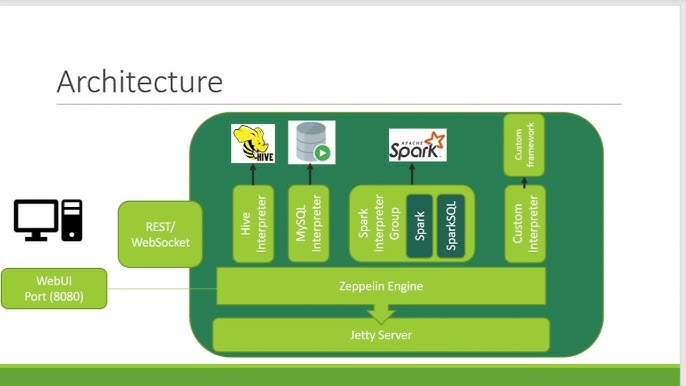
Zeppelin, d'altra parte, ha un'architettura diversa. Utilizza Interpreti Elaborare il codice in ogni blocco, con ogni interprete progettato per un linguaggio o un servizio specifico. Per Spark, Zeppelin utilizza un sistema dedicato Interprete Spark.
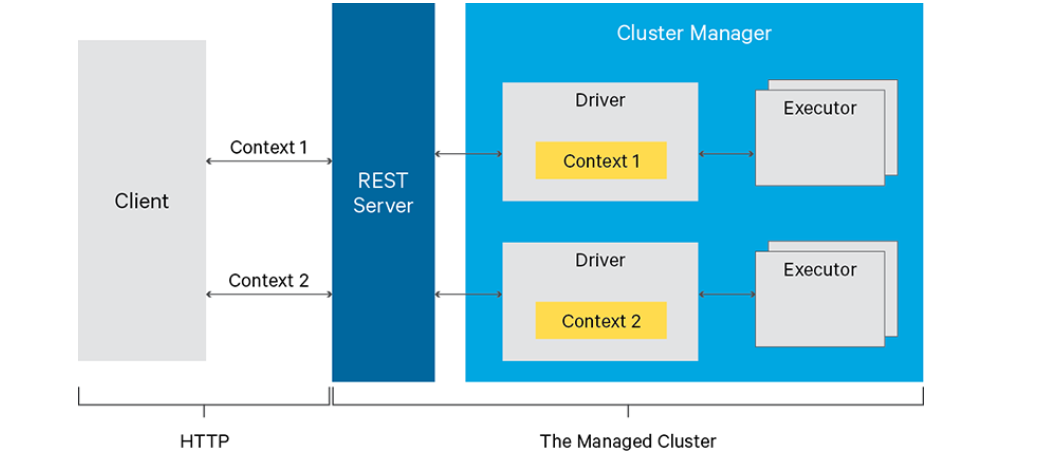
But how does Ilum connect Jupyter’s Spark magic and Zeppelin’s interpreters to manage jobs and organize them into meaningful groups? It does it by utilizing Livy Server with Proxy over it.
Molti servizi, tra cui Jupyter con il suo Spark Magic e Zeppelin con il suo Livy Engine, sfruttano Livy per la comunicazione con Spark. Livy è un server che fornisce un'API REST per l'interazione con Spark.
Ilum fornisce la propria implementazione dell'API Livy chiamata Ilum-Livio-Proxy che limita le sessioni Spark con i servizi Ilum. Ad esempio, se si crea una sessione Livy in Jupyter, verrà visualizzato un servizio di codice corrispondente all'interno del carico di lavoro Ilum.
For detailed Spark workflows and notebook-specific Spark usage, see Guida per i notebook Jupyter.
Deployment Overview
- JupyterLab:
- JupyterLab is enabled and preconfigured by default.
- Access from Moduli > JupyterLab nell'interfaccia utente di Ilum.
- Only one instance.
- Version control (Gitea) and Spark integration are ready-to-use.
-
JupyterHub
- JupyterHub (multi-user) is not enabled and preconfigured by default (use this guide to deploy).
- Access from Moduli > JupyterHub nell'interfaccia utente di Ilum.
- Each user receives a private JupyterLab instance.
- Version control (Gitea) and Spark integration are ready-to-use.
-
Zeppelin:
- Zeppelin is not enabled and preconfigured by default (use this guide to deploy).
- Access from Moduli > Zeppelin nell'interfaccia utente di Ilum.
- Pre-integrated with Livy Proxy and Spark.
Notebook Features in Ilum
All supported notebook environments provide:
- Executable, incremental cells (Python, Scala, SQL, Bash, etc.)
- Data visualization (charts, tables, widgets, dashboards)
- Integration with Spark clusters
- Access to Ilum storages and services
- Documentation via Markdown/HTML
- Data lineage and session management
- Collaboration and sharing options