Data Science Platform
Ilum is a comprehensive end-to-end data science platform that streamlines the entire machine learning lifecycle—from data exploration and model development to production deployment and monitoring. Built on enterprise-grade infrastructure, Ilum provides data scientists and ML engineers with powerful tools, seamless integrations, and automated workflows that accelerate innovation while maintaining scalability and reliability.
The Modern Data Science Challenge
Traditional data science workflows are fragmented across multiple tools, requiring extensive setup, configuration, and maintenance. Data scientists spend more time on infrastructure management than on actual modeling and analysis. Common challenges include:
- Complex Tool Integration: Connecting notebooks, data sources, compute engines, and deployment platforms
- Environment Management: Setting up consistent development and production environments
- Data Access Bottlenecks: Complicated data pipelines and access controls slowing down exploration
- Model Lifecycle Management: Tracking experiments, versioning models, and managing deployments
- Scaling Challenges: Moving from prototypes to production-ready, scalable solutions
Ilum's Unified Data Science Approach
Ilum eliminates these challenges by providing a unified, cloud-native data science platform that integrates all essential components into a cohesive ecosystem. Our approach centers on four core principles:
1. Seamless Data Access
Direct connectivity to modern data lake formats (Delta, Iceberg, Hudi, Paimon) through pre-configured catalogs, enabling instant access to enterprise datasets without complex setup.
2. Integrated Development Environment
Production-ready notebooks with built-in Spark and Trino connectivity, comprehensive ML libraries, and collaborative features that support the entire data science workflow.
3. Automated MLOps
End-to-end automation from experiment tracking and model registry to scheduled training pipelines and production deployment, reducing manual overhead and accelerating time-to-market.
4. Enterprise-Grade Infrastructure
Scalable, secure, and compliant platform built on Kubernetes with advanced monitoring, resource management, and multi-cluster support for enterprise requirements.
Platform Architecture & Kubernetes Integration
Ilum leverages a cloud-native architecture designed to run Spark-based data science workloads directly on Kubernetes. This design ensures resource isolation, dynamic scalability, and operational efficiency compared to legacy Hadoop Yarn setups.
Kubernetes Operator & Pod Lifecycle
At the core of the platform is the Spark Operator, which manages the lifecycle of Spark applications as native Kubernetes Custom Resources (CRDs).
- Pod-per-User Isolation: Each interactive session (Jupyter/Zeppelin) runs in its own dedicated Pod. This ensures that a memory leak or crash in one user's environment never impacts others.
- Dynamic Executor Provisioning: When a user executes a Spark action, Ilum requests executors from the Kubernetes API. These pods are spun up on-demand and terminated immediately after the job completes, optimizing cloud costs.
- Node Selectors & Taints: Workloads can be pinned to specific node pools (e.g., high-memory nodes for training, general-purpose for ETL) using standard Kubernetes affinity rules.
Resource Quotas & Limits
Administrators can define granular ResourceQuota policies at the namespace level to control compute consumption:
apiVersion: v1
gentile: ResourceQuota
Metadati:
  nome: dati-science-squadra-un
Spec:
  hard:
    requests.cpu: "100"
    requests.memory: 200Gi
    requests.nvidia.com/gpu: "10"
    pods: "50"
This prevents "noisy neighbor" issues where a single massive grid search consumes all available cluster resources.
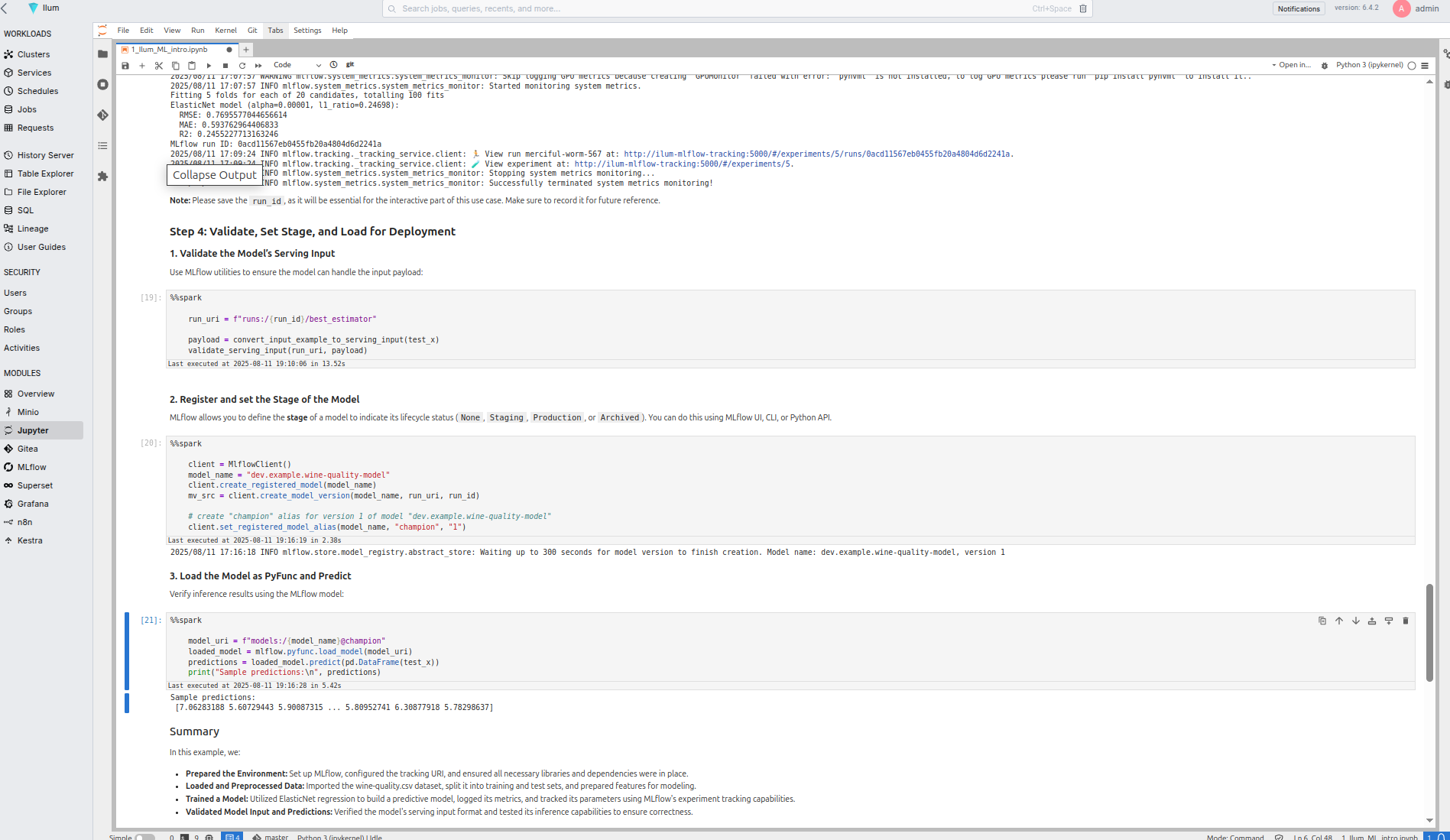
Why Choose Ilum for Data Science?
Accelerated Development Cycles
Di Ilum pre-wired notebook environments eliminate setup friction, connecting directly to Spark clusters and data catalogs. Data scientists can load DataFrames from cataloged datasets without any additional plumbing, reducing time-to-insight from days to minutes.
Production-Ready from Day One
Unlike traditional notebook environments that struggle with productionization, Ilum notebooks are designed for both exploration and production deployment. Code developed in notebooks can seamlessly transition to scheduled jobs and automated pipelines.
Comprehensive ML Library Support
Built-in support for industry-standard libraries including scikit-learn, XGBoost, PyTorch, TensorFlow, and more. Starter notebooks and pipeline templates for common use cases (classification, regression, time-series) help teams quickly adopt best practices.
Enterprise MLOps at Scale
Integrated experiment tracking, model registry, and automated deployment pipelines provide enterprise-grade MLOps capabilities without the complexity of managing multiple tools and platforms.
Core Data Science Features
Pre-Configured Notebook Environments
Ilum provides production-ready Jupyter and Zeppelin environments that are seamlessly integrated with the data platform. These environments are not just standalone containers but are deeply integrated into the cluster's networking and security mesh.
Instant Data Connectivity
- Direct Spark Integration: Notebooks act as Spark Drivers, connecting to executors within the same Kubernetes namespace via a headless service.
- Catalog Access: Immediate access to Delta, Iceberg, Hudi, and Paimon tables through a shared Hive Metastore or Nessie catalog.
- Multi-Engine Support: Choose between Spark (for batch/training) and Trino (for interactive query speed) within the same notebook.
- Controllo della versione: Built-in Git integration ensures all code is versioned, facilitating code review and CI/CD pipelines.
Advanced Dependency Management
Managing Python dependencies in distributed Spark environments is a critical challenge. Ilum solves this through a multi-layered approach ensuring consistency between the Driver (Notebook) and Executors.
1. Runtime Environment (Conda/Virtualenv)
For rapid prototyping, data scientists can install libraries directly within their session scope. These libraries are automatically shipped to executors using Spark's archive distribution mechanism.
# In-notebook installation
%pip install scikit-learn==1.3.0 torch==2.1.0
2. Immutable Docker Images
For production stability, Ilum encourages the use of custom Docker images. Teams can build images containing their specific ML stack (e.g., specific CUDA versions for deep learning) and define them in the job configuration.
# Spark Profile Configuration
Spec:
  immagine: "registry.company.com/ml-team/pytorch-gpu:2.1.0-cuda11.8"
  imagePullPolicy: Always
This guarantees that the exact same environment used during exploration is used for large-scale distributed training, eliminating "works on my machine" issues.
3. Shared Volume Mounts (PVCs)
Persistent Volume Claims (PVCs) can be mounted to notebook pods to share large static assets (like pre-trained model weights or reference datasets) across the team without duplicating data.
Comprehensive ML Stack
# Example: Loading data and building models with zero setup
importazione pandas come pd
importazione Flusso ML
Da Pyspark.SQL importazione Sessione scintilla
Da sklearn.ensemble importazione RandomForestClassifier
importazione xgboost come xgb
importazione torch

# Direct access to cataloged datasets
Df = scintilla.tavolo("analytics.customer_features")

# Seamless integration with ML libraries
modello = RandomForestClassifier(n_estimators=100)
modello.fit(X_train, y_train)

# Automatic experiment tracking
con Flusso ML.start_run():
    Flusso ML.log_params(modello.get_params())
    Flusso ML.log_metric("Precisione", accuracy_score(y_test, predictions))
    Flusso ML.sklearn.log_model(modello, "random_forest_model")
Model Development Workflow
Data Lakehouse Reproducibility (Time Travel)
A key requirement for MLOps is the ability to reproduce a specific model version. Ilum leverages Lago Delta e Iceberg capabilities to ensure that training data is immutable for a given version.
Data scientists can query the exact state of a dataset as it existed at the time of training, eliminating data drift issues during debugging:
# Train on the exact dataset version used in Experiment ID #452
df_train = scintilla.leggere.format("delta") \
    .opzione("versionAsOf", 145) \
    .load("s3a://warehouse/analytics/customer_features")

# Or query by timestamp
df_validation = scintilla.leggere.format("iceberg") \
    .opzione("as-of-timestamp", "2023-10-25 12:00:00") \
    .load("glue_catalog.default.transactions")
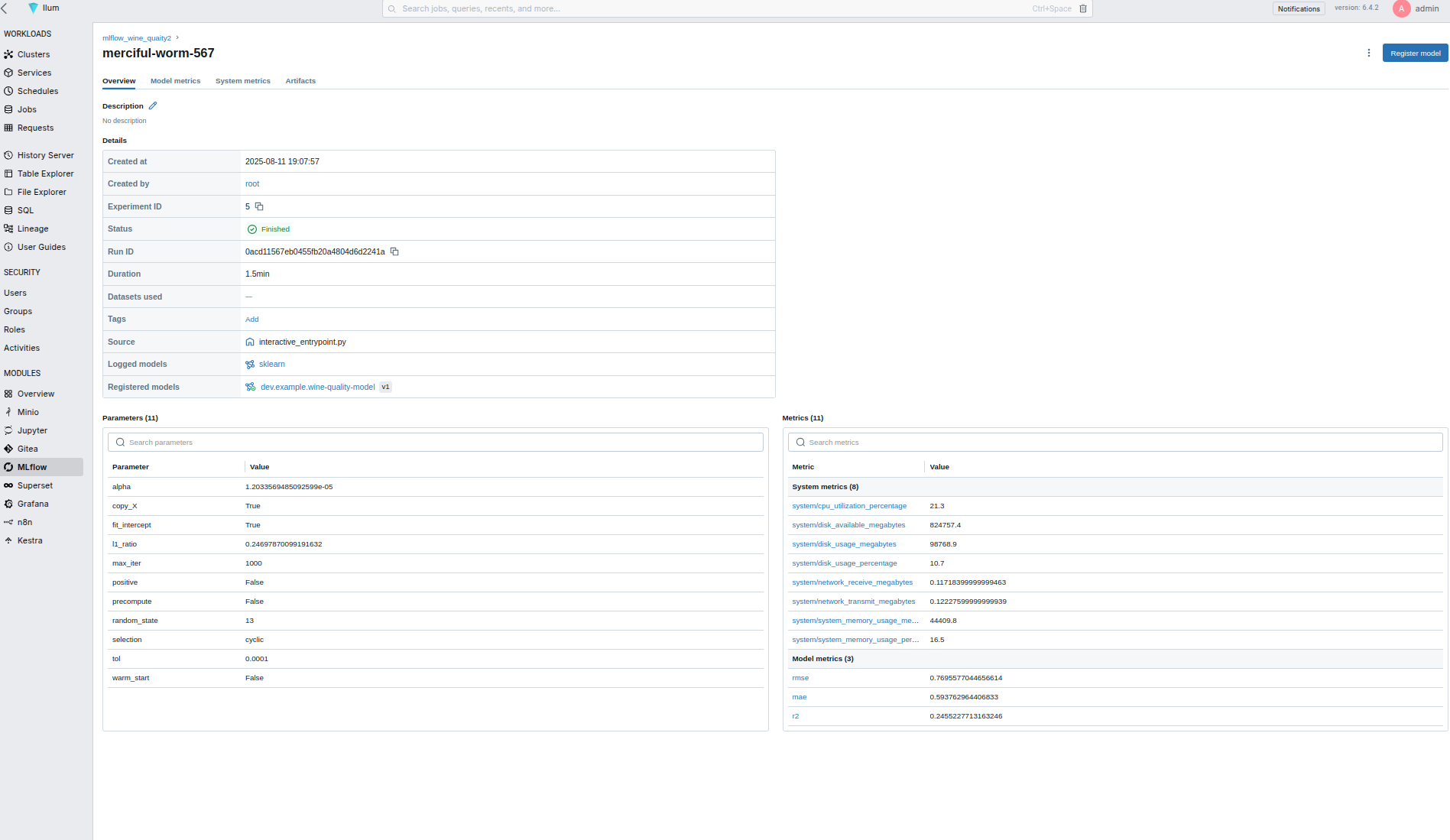
Starter Templates and Best Practices
Ilum includes curated notebook templates for common ML scenarios:
- Classification Problems: Binary and multi-class classification with feature engineering pipelines
- Regression Analysis: Linear, polynomial, and ensemble regression models
- Time Series Forecasting: ARIMA, Prophet, and deep learning approaches
- Clustering and Segmentation: K-means, hierarchical, and density-based clustering
- Deep Learning: PyTorch and TensorFlow templates for neural networks
Feature Engineering Pipeline
# Example: Automated feature engineering pipeline
Da Pyspark.ml.feature importazione VectorAssembler, StandardScaler
Da Pyspark.ml importazione Pipeline

# Define feature engineering pipeline
assembler = VectorAssembler(inputCols=feature_columns, outputCol="features")
scaler = StandardScaler(inputCol="features", outputCol="scaled_features")

# Create reusable pipeline
feature_pipeline = Pipeline(stages=[assembler, scaler])
transformed_data = feature_pipeline.fit(training_data).transform(training_data)
MLOps and Model Lifecycle Management
Monitoraggio degli esperimenti
Integrated Flusso ML15 provides comprehensive experiment tracking:
- Automatic Logging: Parameters, metrics, and artifacts tracked automatically
- Experiment Comparison: Visual comparison of model performance across runs
- Reproducibility: Complete environment and code versioning for reproducible results
- Collaborative Tracking: Team-wide visibility into experiments and results
Model Registry and Versioning
# Example: Model registration and lifecycle management
Da Flusso ML.inseguimento importazione MlflowClient

cliente = MlflowClient()

# Register model with versioning
model_uri = f"runs:/{run_id}/model"
registered_model = cliente.create_registered_model("customer_churn_predictor")

# Create model version
model_version = cliente.create_model_version(
    nome="customer_churn_predictor",
    source=model_uri,
    run_id=run_id
)

# Promote model through lifecycle stages
cliente.transition_model_version_stage(
    nome="customer_churn_predictor",
    Versione=model_version.Versione,
    stage="Production"
)
Automated Training and Inference Pipelines
Declarative Pipeline Configuration
Define training and inference pipelines using simple YAML configurations:
# training_pipeline.yaml
nome: customer_churn_training
schedule: "0 2 * * *"  # Daily at 2 AM

data_sources:
  - catalogo: analitica
    tavolo: customer_features
    filtro: "created_date >= current_date() - interval 30 days"

preprocessing:
  - digitare: feature_engineering
    configurazione:
      numeric_features: ["age", "tenure", "monthly_charges"]
      categorical_features: ["contract_type", "payment_method"]

modello:
  digitare: xgboost
  hyperparameters:
    n_estimators: 100
    max_depth: 6
    learning_rate: 0.1

evaluation:
  Metriche: ["Precisione", "precision", "recall", "f1_score"]
  validation_split: 0.2

deployment:
  model_registry: "customer_churn_predictor"
  stage: "staging"
  auto_promote: vero
  promotion_criteria:
    accuracy: "> 0.85"
Scheduled Training Jobs
# Example: Automated model retraining
Da ilum.jobs importazione ScheduledJob
Da ilum.pipelines importazione MLPipeline

# Define scheduled training job
training_job = ScheduledJob(
    nome="customer_churn_retrain",
    schedule="0 2 * * 1",  # Weekly on Monday at 2 AM
    pipeline=MLPipeline.from_yaml("training_pipeline.yaml"),
    grappolo="production-cluster",
    risorse={
        "driver_memory": "4g",
        "executor_memory": "8g",
        "executor_instances": 5
    }
)

# Deploy to production
training_job.deploy()
Build & Deploy AI Applications
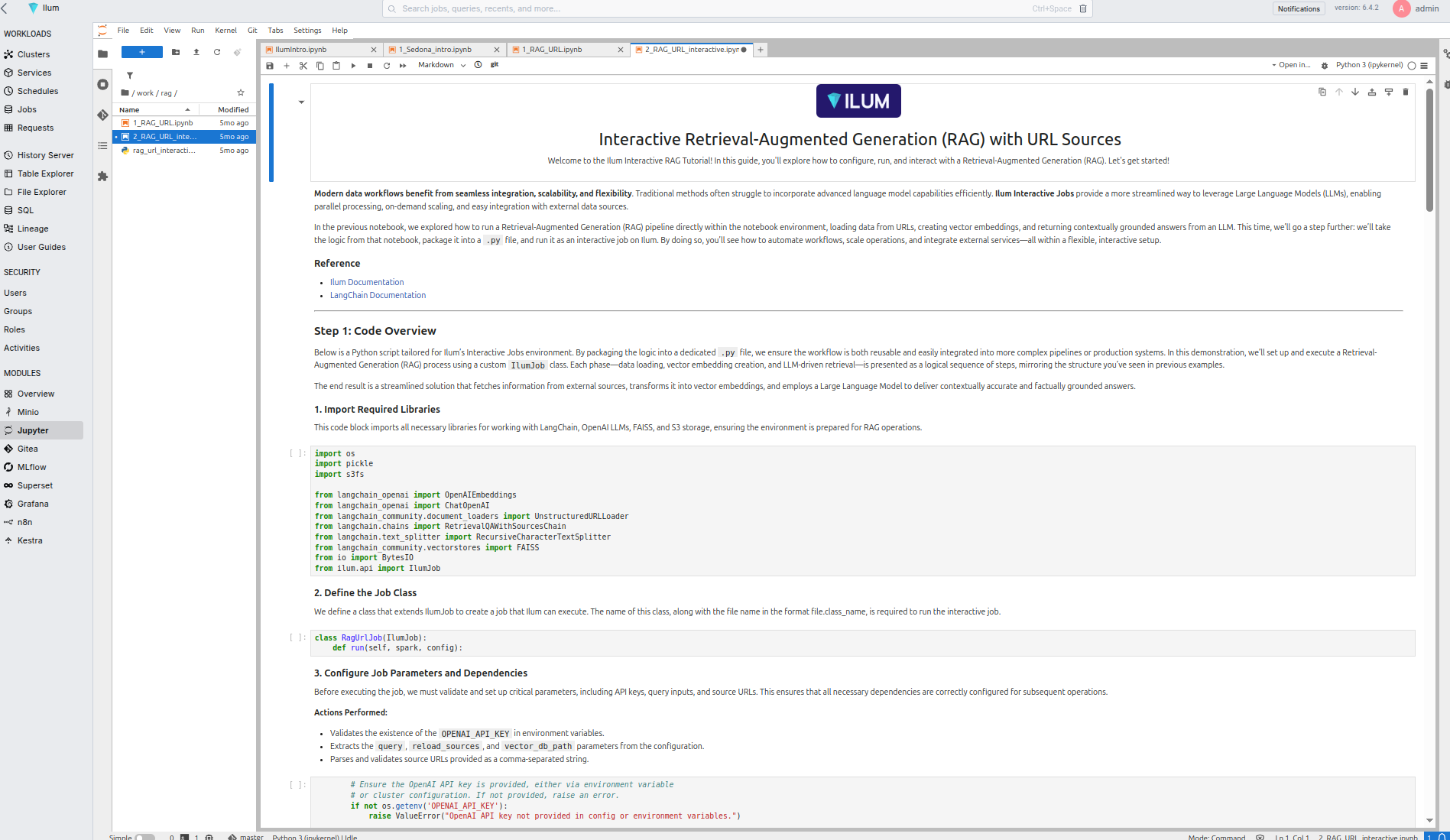
Di Ilum "Build & Deploy AI Apps" feature enables rapid deployment of ML models as production-ready applications:
Model Serving Infrastructure
- Auto-scaling Endpoints: Automatically scale based on demand
- A/B Testing: Built-in support for model comparison and gradual rollouts
- Monitoring & Alerting: Real-time performance monitoring and anomaly detection
- Security & Compliance: Enterprise-grade security with role-based access control
Application Templates
# Example: Deploy model as REST API
Da ilum.deployment importazione ModelApp, ModelEndpoint

# Create application from registered model
app = ModelApp(
    nome="churn-prediction-api",
    modello="customer_churn_predictor",
    Versione="latest"
)

# Configure endpoint
Endpoint = ModelEndpoint(
    sentiero="/predict",
    input_schema={
        "customer_id": "corda",
        "features": "array"
    },
    output_schema={
        "customer_id": "corda",
        "churn_probability": "float",
        "risk_category": "corda"
    }
)

app.add_endpoint(Endpoint)
app.deploy(grappolo="production-cluster")
Security Architecture: Identity & Network Isolation
Ilum employs a "Defense in Depth" strategy critical for enterprise environments dealing with sensitive PII or financial data.
Identity Propagation (OAuth2)
Security in Ilum is not just at the perimeter. We implement Identity Propagation, where the user's identity (via OAuth2/OIDC token) is passed from the Notebook session through to the Spark Driver and Executors.
- Storage Access: When a Spark Executor reads from S3, it uses the user's credentials, not a generic service account. This ensures that file-level permissions defined in AWS IAM or MinIO Policies are strictly enforced.
- Audit Trails: All data access logs in the storage layer reflect the actual user (e.g.,
[email protected]) rather than a genericspark-user, satisfying strict compliance requirements (GDPR, HIPAA).
Network Policies & Namespace Isolation
Ilum utilizes Kubernetes NetworkPolicies to isolate tenants:
- Ingress Deny-All: By default, pods in a data science namespace cannot receive traffic from outside.
- Egress Whitelisting: Notebooks can only connect to approved endpoints (e.g., PyPI, Maven, internal Git), preventing data exfiltration to unauthorized external servers.
Integration with Ilum Ecosystem
Data Platform Integration
- Seamless Data Access: Direct connectivity to all Ilum-managed data sources
- Catalog Integration: Automatic discovery of tables, schemas, and metadata
- Lineage Tracking: Automatic data lineage generation for ML pipelines
- Quality Monitoring: Built-in data quality checks and validation
Compute Engine Flexibility
- Integrazione con Spark: Distributed computing for large-scale feature engineering
- Trino Connectivity: High-performance analytics for exploratory data analysis
- Ottimizzazione delle risorse: Automatic resource allocation based on workload requirements
- Supporto multi-cluster: Deploy across multiple clusters for scalability
Security and Governance
- Role-Based Access: Fine-grained permissions for data and model access
- Audit Logging: Complete audit trail for compliance and governance
- Model Governance: Approval workflows for model promotion and deployment
- Data Privacy: Built-in support for data masking and privacy protection
Getting Started with Data Science in Ilum
Prerequisiti
- Ilum core platform deployed
- Notebook environments enabled (JupyterLab/JupyterHub)
- MLflow experiment tracking configured
- Access to data catalogs (Hive Metastore)
Quick Start Guide
-
Access Your Notebook Environment
# Access from Ilum UI: Modules > JupyterLab
# Or via direct URL: https://your-ilum-instance/jupyter -
Load Your First Dataset
# Connect to Spark and load cataloged data
Da Pyspark.SQL importazione Sessione scintilla

scintilla = Sessione scintilla.builder.nomeapp("DataScience").getOrCreate()
Df = scintilla.tavolo("analytics.customer_data")
Df.mostrare() -
Build Your First Model
# Use starter template for classification
Da ilum.templates importazione ClassificationPipeline

pipeline = ClassificationPipeline(
    target_column="churn",
    feature_columns=["age", "tenure", "monthly_charges"]
)

modello = pipeline.fit(Df)
predictions = modello.transform(test_data) -
Track and Deploy
# Automatic experiment tracking
con Flusso ML.start_run():
    # Training code here
    Flusso ML.scintilla.log_model(modello, "churn_model")

# Deploy to production
Da ilum.deployment importazione deploy_model
deploy_model("churn_model", Endpoint="/predict/churn")
Advanced Data Science Workflows
Distributed Training & GPU Acceleration
For deep learning workloads that exceed the capacity of a single machine, Ilum provides native support for distributed training on Kubernetes.
Requesting GPU Resources
Ilum integrates with the NVIDIA Device Plugin for Kubernetes. Data scientists can request GPUs directly from their notebook configuration or Spark job definition:
# Spark Executor Configuration
risorse:
  limits:
    nvidia.com/gpu: 2
Distributed Strategies (Horovod / TorchDistributor)
Instead of complex SSH setups, Ilum utilizes Spark's scheduling to manage distributed training contexts.
Example: PyTorch Distributed Training with Spark TorchDistributor
Da Pyspark.ml.torch.distributor importazione TorchDistributor

def train_fn(learning_rate):
    # Standard PyTorch training loop
    # ...
    ritorno storia

# Launch distributed training across 4 nodes with 1 GPU each
distributor = TorchDistributor(
    num_processes=4,
    local_mode=False,
    use_gpu=Vero
)

distributor.Correre(train_fn, 1e-3)
Multi-Model Ensemble
# Example: Ensemble learning with multiple algorithms
Da sklearn.ensemble importazione VotingClassifier
Da xgboost importazione XGBClassifier
Da lightgbm importazione LGBMClassifier

# Define ensemble
ensemble = VotingClassifier([
    ('xgb', XGBClassifier()),
    ('lgb', LGBMClassifier()),
    ('rf', RandomForestClassifier())
])

# Track ensemble experiments
con Flusso ML.start_run():
    ensemble.fit(X_train, y_train)
    predictions = ensemble.predict(X_test)

    Flusso ML.log_metric("ensemble_accuracy", accuracy_score(y_test, predictions))
    Flusso ML.sklearn.log_model(ensemble, "ensemble_model")
Distributed Deep Learning
# Example: PyTorch distributed training
importazione torch
importazione torch.distributed come dist
Da torch.nn.parallel importazione DistributedDataParallel

# Initialize distributed training
dist.init_process_group("nccl")

# Define model and distribute
modello = MyNeuralNetwork()
modello = DistributedDataParallel(modello)

# Train with automatic experiment tracking
con Flusso ML.start_run():
    per epoch in gamma(num_epochs):
        train_loss = train_epoch(modello, train_loader)
        val_loss = validate(modello, val_loader)

        Flusso ML.log_metrics({
            "train_loss": train_loss,
            "val_loss": val_loss
        }, passo=epoch)
Real-Time Feature Engineering
# Example: Streaming feature engineering
Da Pyspark.SQL.functions importazione *
Da Pyspark.SQL.types importazione *

# Define streaming transformations
def feature_engineering_pipeline(Df):
    ritorno Df.withColumn("age_group",
                        quando(col("age") < 25, "young")
                        .quando(col("age") < 65, "adult")
                        .otherwise("senior")) \
            .withColumn("monthly_avg",
                       col("total_charges") / col("tenure"))

# Apply to streaming data
streaming_features = streaming_df.transform(feature_engineering_pipeline)
Performance Optimization
Gestione delle risorse
# Optimal resource configuration for ML workloads
spark_config:
  autista:
    memory: "8g"
    cores: 4
  executor:
    memory: "16g"
    cores: 8
    instances: 10

  # ML-specific optimizations
  spark.sql.adaptive.enabled: vero
  spark.sql.adaptive.coalescePartitions.enabled: vero
  spark.serializer: org.apache.spark.serializer.KryoSerializer
Data Caching Strategies
# Example: Intelligent data caching
# Cache frequently accessed training data
training_data = scintilla.tavolo("features.training_set")
training_data.cache()

# Persist intermediate results
feature_engineered = raw_data.transform(feature_pipeline)
feature_engineered.persist(StorageLevel.MEMORY_AND_DISK)

# Clean up cache when no longer needed
training_data.unpersist()
Monitoring and Observability
Model Performance Monitoring
# Example: Production model monitoring
Da ilum.monitoraggio importazione ModelMonitor

monitor = ModelMonitor(
    model_name="customer_churn_predictor",
    Metriche=["Precisione", "precision", "recall"],
    data_drift_threshold=0.1,
    performance_threshold=0.8
)

# Set up alerts
monitor.add_alert(
    condition="accuracy < 0.8",
    action="e-mail",
    recipients=["[email protected]"]
)

monitor.deploy()
Data Quality Validation
# Example: Automated data quality checks
Da Pyspark.SQL.functions importazione *

def data_quality_checks(Df):
    checks = {
        "null_percentage": Df.filtro(col("target").isNull()).contare() / Df.contare(),
        "duplicate_percentage": (Df.contare() - Df.dropDuplicates().contare()) / Df.contare(),
        "data_freshness": Df.agg(max("created_date")).collect()[0][0]
    }

    # Log to MLflow
    Flusso ML.log_metrics(checks)
    ritorno checks
Best Practices for Data Science in Ilum
Development Workflow
- Start with Exploration: Use notebooks for initial data exploration and hypothesis testing
- Modularize Code: Move proven code from notebooks to reusable modules
- Version Everything: Use Git integration for code and MLflow for experiments
- Test Early: Implement data validation and model testing from the beginning
- Monitor Continuously: Set up monitoring before deploying to production
Code Organization
project/
├── notebooks/
│   ├── 01_data_exploration.ipynb
│   ├── 02_feature_engineering.ipynb
│   └── 03_model_development.ipynb
├── src/
│   ├── data/
│   │   ├── preprocessing.py
│   │   └── validation.py
│   ├── models/
│   │   ├── training.py
│   │   └── evaluation.py
│   └── deployment/
│       ├── app.py
│       └── monitoring.py
├── pipelines/
│   ├── training_pipeline.yaml
│   └── inference_pipeline.yaml
└── tests/
    ├── test_preprocessing.py
    └── test_models.py
Model Lifecycle Management
- Experimentation Phase: Track all experiments with MLflow
- Development Phase: Use model registry for version control
- Staging Phase: Deploy to staging environment for validation
- Production Phase: Automated deployment with monitoring
- Monitoring Phase: Continuous performance and drift monitoring
- Retirement Phase: Graceful model retirement and replacement
Troubleshooting Common Issues
Performance Issues
- Slow Data Loading: Optimize partition size and file format
- Memory Errors: Adjust Spark executor memory and enable adaptive query execution
- Long Training Times: Consider distributed training or feature selection
Environment Issues
- Library Conflicts: Use isolated conda environments in notebooks
- Resource Contention: Monitor cluster utilization and adjust resource allocation
- Network Connectivity: Verify catalog and storage connectivity
Model Deployment Issues
- Version Conflicts: Ensure model and serving environment compatibility
- Performance Degradation: Monitor model drift and retrain as needed
- Scaling Problems: Configure auto-scaling based on traffic patterns