Apache Spark Connect su Ilum: guida alla configurazione e alla connessione
Che cos'è Spark Connect?
Scintilla Connetti è una moderna interfaccia client-server per Apache Spark that enables remote execution of Spark workloads from lightweight clients such as Python, Java, Scala, R, and SQL-based tools. Introduced in Spark 3.4, Spark Connect decouples the Spark client from the Spark runtime, allowing developers to Crea applicazioni di dati interattive, notebook e dashboard senza distribuire il motore Spark completo in locale.
Le leve di Spark Connect Comunicazione basata su gRPC per interagire con un server Spark remoto, offrendo flessibilità, maggiore sicurezza e un'infrastruttura semplificata per i flussi di lavoro di ingegneria dei dati, scienza dei dati e analisi.
Lo è very similar to Ilum’s approach to Spark microservices, in cui i componenti Spark vengono containerizzati ed esposti come servizi dinamici. Il design utilizzato in Distribuzione del microservizio PySpark in Kubernetes : entrambi abilitano l'accesso scalabile, senza stato e sicuro a Spark senza la configurazione completa del cluster sul lato client.
Why use Spark Connect on Kubernetes?
Traditional Spark submission often requires complex local setups (Java, Hadoop binaries, exact Spark versions). Spark Connect eliminates this "dependency hell."
| Caratteristica | Traditional Spark Submission (scintilla-invio) | Scintilla Connetti |
|---|---|---|
| Architettura | Monolithic (Driver runs on client or cluster edge) | Decoupled (Client is separate from Server) |
| Client Requirements | Heavy (Requires Java, Spark binaries, Hadoop configs) | Lightweight (Only Python/Go/Scala library required) |
| Network Protocol | Custom RPC (Sensitive to version mismatch) | gRPC (Standard, version-agnostic, firewall-friendly) |
| Iteration Speed | Slow (Build & Deploy jars) | Fast (Interactive, REPL-style development) |
| Supporto linguistico | limited to JVM/Python | Polyglot (Python, Scala, Go, Rust, etc.) |
For a deeper dive into how Ilum leverages this for multi-tenancy, see our Architecture Documentation.
In Ilum, Spark Connect si allinea naturalmente con la nostra architettura Spark basata su microservizi. È possibile distribuire un server Spark Connect come processo standard e accedervi tramite vari metodi di connessione, usando il nome del pod, l'IP del pod o un servizio esposto tramite Kubernetes.
Prepare Your Client Environment
Before connecting, you need a lightweight client library. Unlike traditional Spark, you do not need a local JVM or Hadoop installation.
Python (PySpark)
- Spark 4 (default)
- Spark 3
pip install Pyspark[connect]==4.0.1 grpcio-status
pip install Pyspark[connect]==3.5.8 grpcio-status
Scala (sbt)
For Scala applications, add the Spark Connect client dependency:
- Spark 4 (default)
- Spark 3
libraryDependencies += "org.apache.spark" %% "spark-connect-client-jvm" % "4.0.1"
libraryDependencies += "org.apache.spark" %% "spark-connect-client-jvm" % "3.5.8"
Spark SQL CLI
You can also use the generic Spark SQL CLI to connect remotely:
/path/to/spark/bin/spark-sql --remote "sc://<ilum-cluster-address>:15002"
Nota: Always match your client library version (e.g.,
4.0.1; fallback3.5.8) with the Spark version running on your Ilum cluster.
Creazione di un'istanza di Apache Spark Connect tramite l'interfaccia utente di Ilum
Seguire questa procedura per avviare un server Spark Connect come processo nel cluster Ilum usando l'interfaccia utente Web:
-
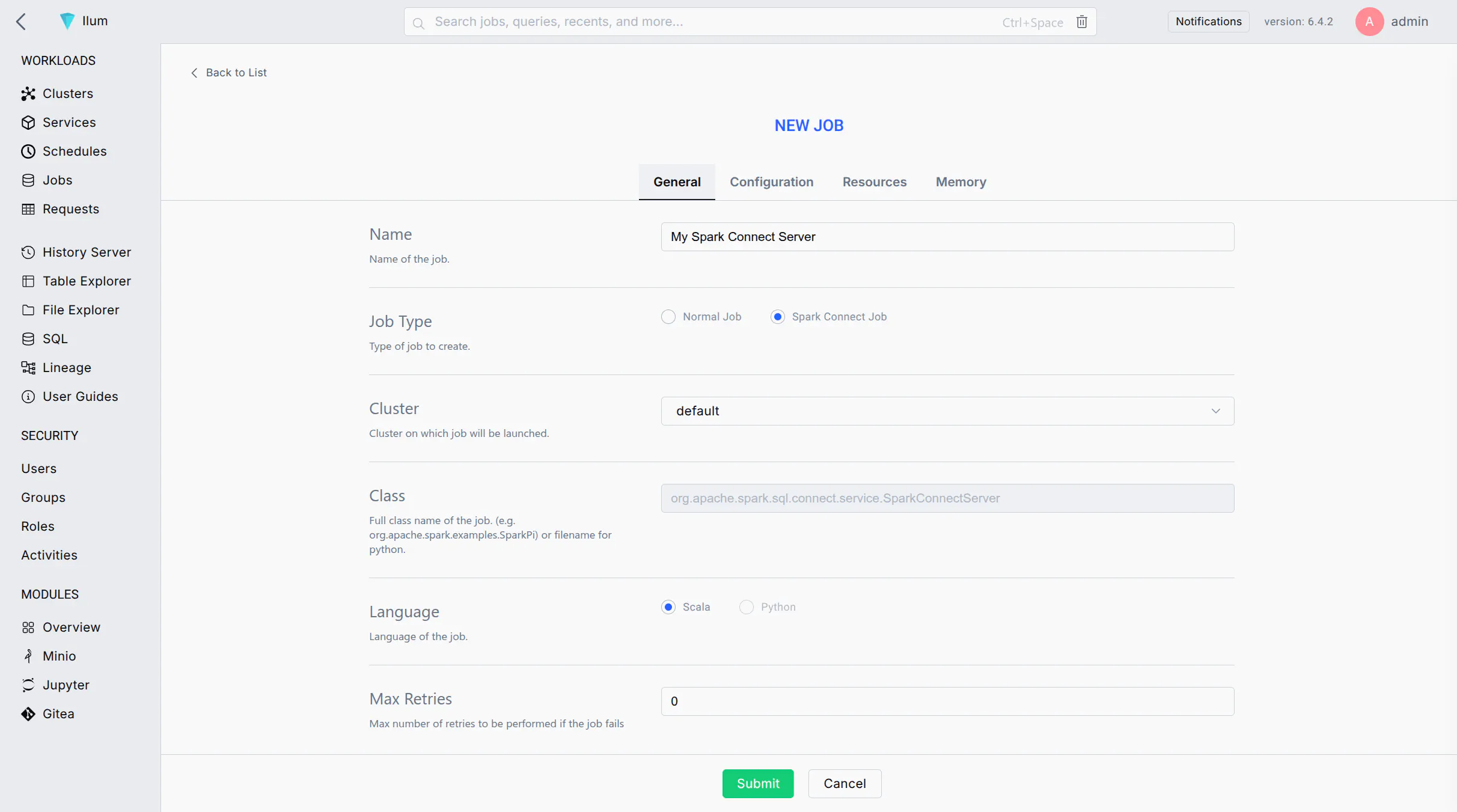
Start a New Spark Job: Log in to the Ilum UI and navigate to the Jobs section. Click on Nuovo lavoro per creare un nuovo processo Spark.
-
Job Name: Enter a recognizable name for the job (e.g.,
Spark Connect Server) per identificarlo successivamente nell'interfaccia utente. -
Main Class: Set the job's main class to:
org.apache.spark.sql.connect.service.SparkConnectServerThis is the built-in Spark class that starts the Spark Connect server process, enabling remote connectivity to Spark clusters.
-
Spark Configuration: Go to the Configuration tab/section for the job. Add the following Spark property to ensure the Spark Connect server code is available:
- Spark 4 (default)
- Spark 3
Key: spark.jars.packages
Valore: org.apache.spark:spark-connect_2.13:4.0.1
Key: spark.jars.packages
Valore: org.apache.spark:spark-connect_2.12:3.5.8
This configuration instructs Spark to fetch the Spark Connect library from Maven when the job starts.
-
(Optional) Label the Pod: If you plan to expose this Spark Connect server via a Kubernetes Service, add a label to the Spark driver pod:
- Key:
spark.kubernetes.driver.label.type - Valore:
SparkConnect
This will tag the Spark Connect server's pod with a label
tipo=sparkconnectfor easy service selection. - Key:
-
Submit the Job: Click Invia. Ilum distribuirà il processo Spark nel cluster. Dopo un breve periodo di tempo, il processo dovrebbe essere visualizzato nell'elenco dei processi in esecuzione.
-
Verify the Server is Running: Wait for the job status to become "Running". You can check the job's logs for a message indicating Spark Connect has started (e.g., a log line mentioning port 15002). Once running, the Spark Connect server is listening for client connections on the default port 15002.
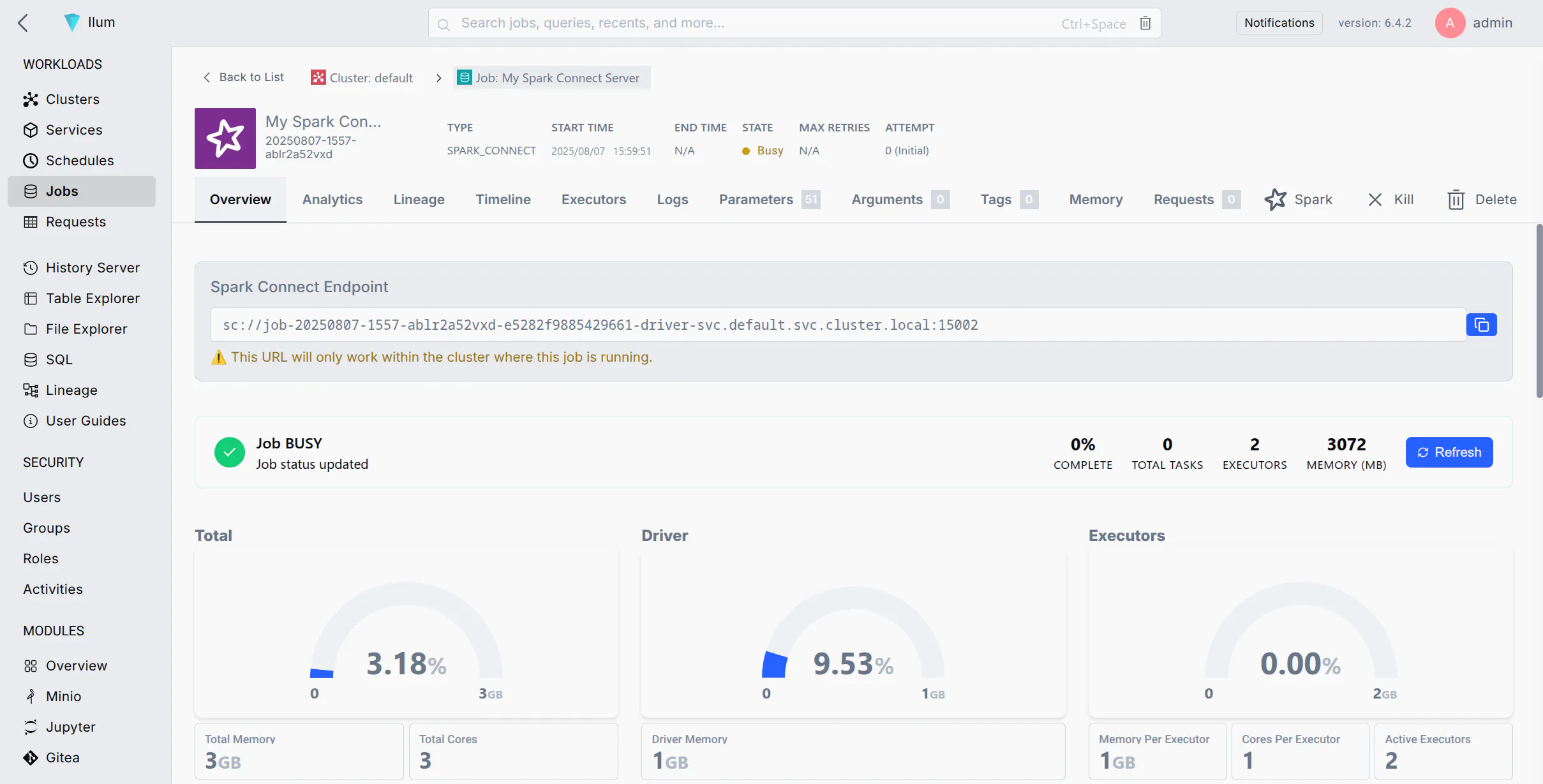
If your job fails immediately, ensure you added spark.jars.packages with the correct version.
Connessione al server Spark Connect
Una volta che il server Spark Connect è in esecuzione, è possibile connettersi ad esso da un client Spark (ad esempio, PySpark, Spark shell, sparklyr, ecc.) utilizzando l'URL di Spark Connect (Sc://...). Di seguito sono riportati diversi metodi di connessione a seconda della configurazione della rete:
- Metodo 1: Connessione in base al nome del pod (DNS del cluster)
- Metodo 2: Connessione tramite IP pod
- Method 3: Port Forwarding with kubectl
- Metodo 4: esposizione di un servizio per Spark Connect
If your environment allows DNS resolution of pod names (for example, your client is within the cluster or can resolve the cluster's internal DNS), you can connect using the pod's DNS name. Kubernetes assigns each pod a DNS name of the form <pod-name>. <namespace>.pod.cluster.local (Kubernetes DNS). This DNS name resolves to the pod's IP address inside the cluster.
Passi:
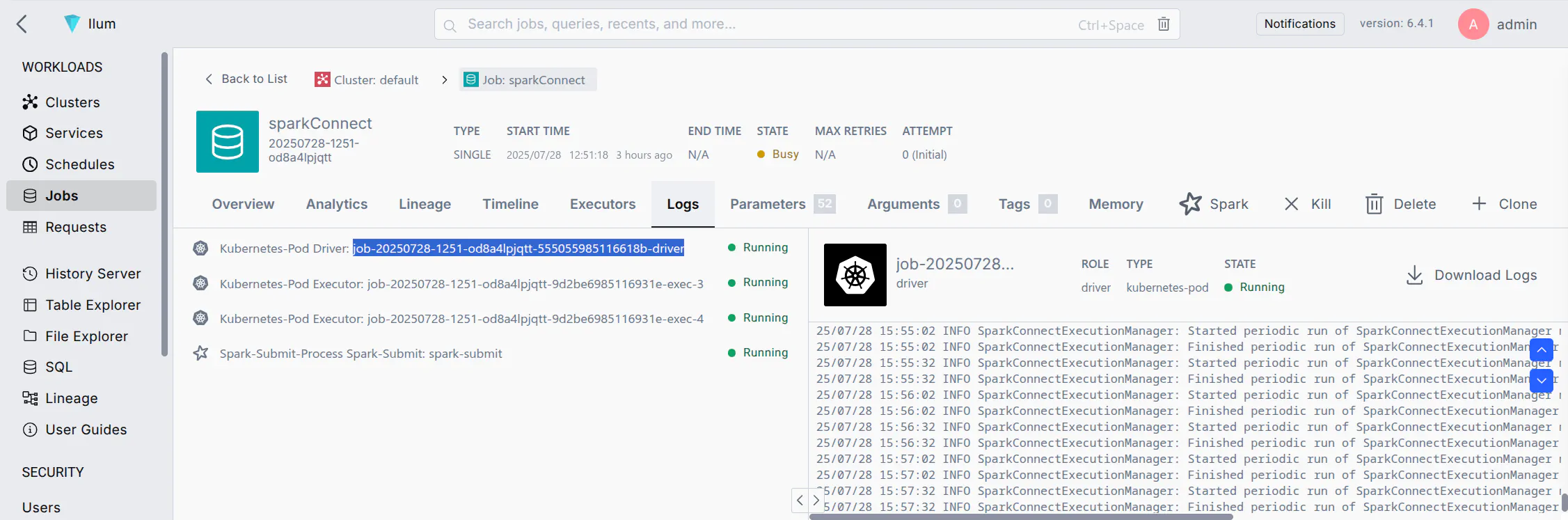
- Find the Pod Name: In the Ilum UI, locate the Spark Connect job you started. Note the driver pod name (Ilum may show it in the job details or logs). It will be something like
lavoro-xxxxxx-driver(il formato esatto può variare). - Construct the URL: Use the pod's fully qualified DNS name. For example, if the pod name is
lavoro-abc123-driverNeldefaultnamespace, l'indirizzo sarebbe:sc://job-abc123-driver.default.pod.cluster.local:15002 - Connect via Spark Client: Use this URL in your SparkSession builder or Spark shell. For example, in PySpark you can do:
notebook.ipynb
Da Pyspark.SQL importazione Sessione scintilla

scintilla = Sessione scintilla.builder.remoto(
    "sc://job-abc123-driver.default.pod.cluster.local:15002"
).getOrCreate()
This will create a Spark session that connects remotely to the Spark Connect server at the given DNS address. Ensure that your environment's DNS can resolve .pod.cluster.local indirizzi (in genere true solo se in esecuzione all'interno del cluster o tramite VPN alla rete del cluster).
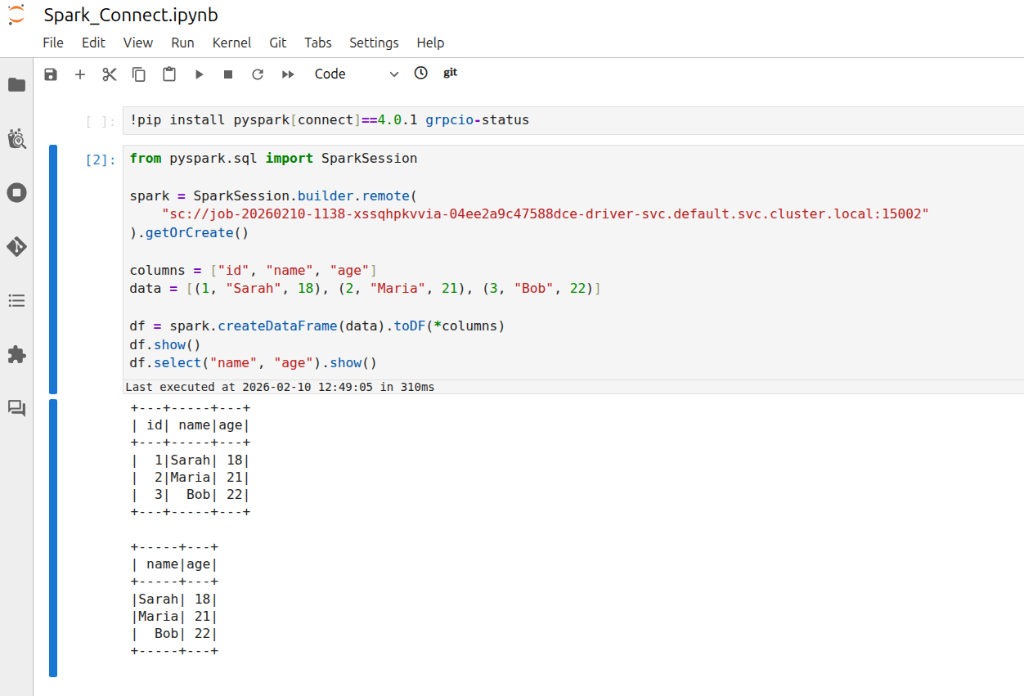
Nota: This is crucial for managing your Apache Spark applications. If your client is running inside the same namespace in the cluster, you might not need the full domain. For instance, just sc://job-abc123-driver:15002 could work due to Kubernetes' DNS search path. However, using the full pod.cluster.local L'indirizzo con lo spazio dei nomi è l'approccio più esplicito e affidabile.
If DNS resolution is not available, you can use the pod's IP address directly in the Spark Connect URL. This requires that your client environment can reach the pod IP (e.g., if you are on the same network or have appropriate routing to the cluster's pod network).
Passi:
- Get the Pod IP: Find the IP address of the Spark Connect pod. In Ilum UI, check the job details for an IP, or use the CLI:
kubectl get pod <pod-name> -o wideto see the pod's IP. - Construct the URL: Use the IP in place of the host. For example, if the pod IP is
10.42.1.25, l'URL sarebbe:sc://10.42.1.25:15002 - Connect via Spark Client: Use the IP-based URL in your Spark client. For example:
connect_by_ip.py
scintilla = Sessione scintilla.builder.remoto("sc://10.42.1.25:15002").getOrCreate()
In questo modo si tenterà di connettersi alla porta 15002 su tale IP.
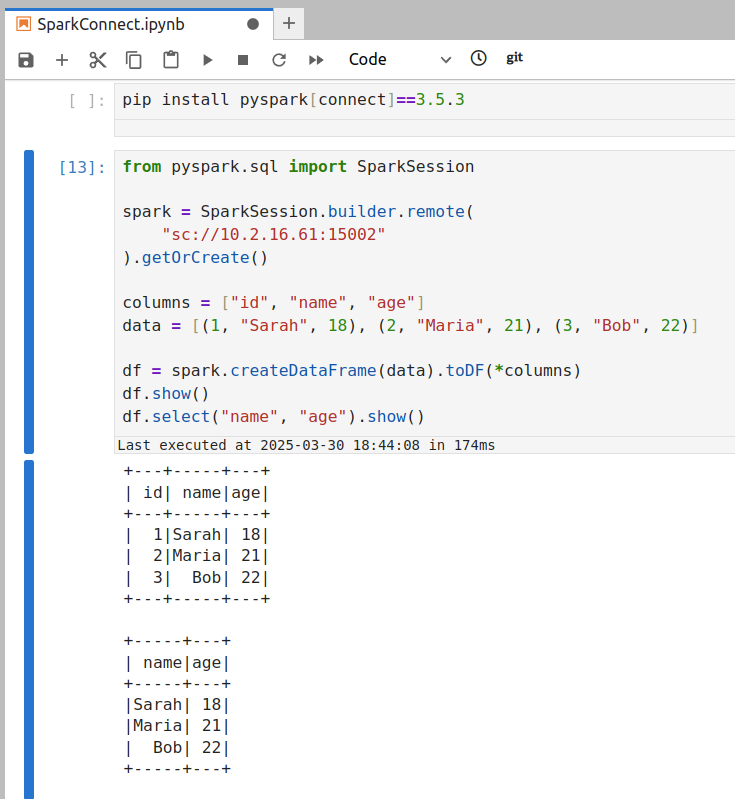
Assicurati che la tua macchina possa effettivamente raggiungere quell'indirizzo IP del server Spark.
- Se il tuo cliente è all'interno del cluster (o nello stesso VPC/rete), l'IP del pod deve essere raggiungibile.
- Se il tuo cliente è All'esterno del cluster (e.g., your local laptop), the pod IP is likely not directly routable. In that case, this method will time out or refuse connection. You'd then need to use Method 3 or 4 instead.
If you are connecting from outside the cluster (for example, from your local development environment) and cannot reach the pod IP or DNS directly, a convenient approach is to use Kubernetes port forwarding. Port forwarding opens a tunnel from your local machine to the remote pod's port.
Passi:
- Run Port-Forward: Open a terminal on your machine that has access to the Kubernetes cluster (where
kubectlè configurato). Correre:SostituirePort Forwardkubectl port-forward <pod-name> 15002:15002<pod-name>with the Spark Connect pod's name (e.g.,lavoro-abc123-driver). This command will bind your local port 15002 to the pod's port 15002. You should see output likeInoltro da 127.0.0.1:15002 -> 15002. Mantenere questo processo in esecuzione mentre è necessaria la connessione al server Spark.
-
Connect to Localhost: With the port-forward in place, your local machine is now listening on port 15002. In your Spark client, connect to
localhost:15002utilizzando l'URL di Spark Connect:local_script.pyscintilla = Sessione scintilla.builder.remoto("sc://localhost:15002").getOrCreate()Spark Connect utilizza la porta 15002 per impostazione predefinita (Quickstart: Spark Connect — PySpark 3.5 documentation), in modo da consentire la connettività remota per attivare i cluster.
sc://localhost:15002raggiungerà attraverso il tunnel nel cluster. A questo punto la sessione Spark è connessa in remoto all'istanza Spark del cluster. -
Use Spark as Usual: Once connected, you can use the
scintillasession as if it were local—all DataFrame operations will execute on the cluster.
Questo metodo è spesso il più semplice per lo sviluppo. Al termine, è possibile interrompere l'inoltro della porta premendo Ctrl+C nel terminale che esegue il kubectl port-forward comando.
Per una soluzione più permanente o per consentire a più utenti/client di connettersi facilmente, è possibile esporre il server Spark Connect tramite un servizio Kubernetes. Un servizio fornisce un endpoint di rete stabile (nome DNS e IP) per il pod Spark Connect e può facoltativamente esporlo oltre il cluster (ad esempio, tramite un LoadBalancer o NodePort).
Passaggi per l'esposizione tramite il servizio:
-
Ensure Pod Label: If you haven't already labeled the Spark Connect pod (as suggested in step 5 of the setup above), do so now. You can add a label on the fly with kubectl:
kubectl label pod <pod-name> digitare=SparkConnectSe il pod è già stato etichettato tramite la configurazione di Spark, questo passaggio non è necessario.
-
Create a Service: Define a Kubernetes Service YAML that targets this pod by its label.
spark-connect-service.yamlapiVersion: v1
gentile: Servizio
Metadati:
nome: scintilla-connect-servizio
Namespace: ilum # use the namespace where your Spark Connect pod is running
Spec:
selettore:
digitare: SparkConnect # this label should match the pod's label
Porte:
- nome: SparkConnect
protocollo: TCP
porto: 15002 # service port (clients will use this)
targetPort: 15002 # target port on the pod
porta nodo: 30002 # node port (external users will use this nodeip:30002)
digitare: Porta nodo # ClusterIP is only accessible within the cluster
# Per l'accesso esterno, è possibile utilizzare il tipo: NodePort o LoadBalancer qui.kubectl apply -f spark-connect-service.yamlQuesto servizio instrada il traffico a qualsiasi pod con
Tipo: SparkConnectlabel on port 15002. You can verify withkubectl get svc spark-connect-service.
-
Inside Cluster or VPN: Use the service's DNS name or cluster IP. For example, within the cluster (or on a VPN that can resolve cluster DNS), the URL would be:
sc://spark-connect-service.default.svc.cluster.local:15002osc://spark-connect-service:15002Tutto il traffico verso questo indirizzo verrà inoltrato al pod Spark Connect. -
Outside Cluster (if exposed): If you set the Service type to NodePort or LoadBalancer, use the external address. For NodePort, that might be
sc://<node-ip>:30002. Per LoadBalancer, potrebbe esseresc://<load-balancer-host>:15002a seconda di come il tuo provider cloud lo assegna. Si tratta di scenari avanzati, che spesso sono più semplici per l'accesso esterno.
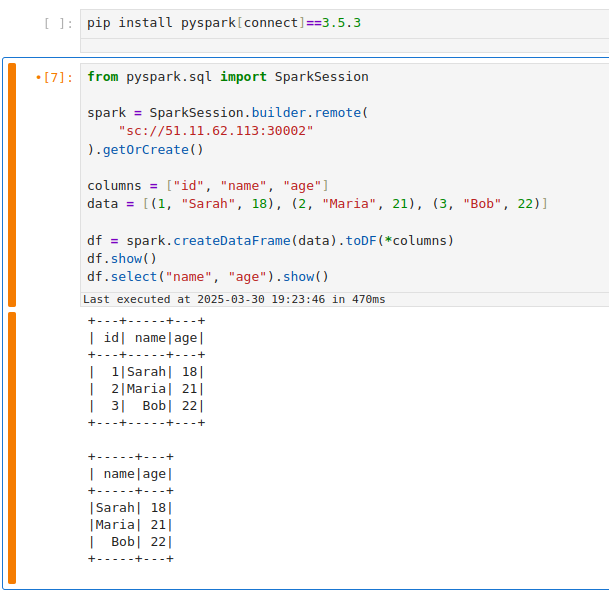
Using a Service has the benefit of a stable name – you don't need to know the exact pod name or IP after it's set up. It also allows you to change the backing pod (e.g., restart the Spark Connect job) without changing how clients connect (as long as the new pod has the same label).
If your Service selector matches multiple Spark Connect pods, client requests can be routed inconsistently. A Kubernetes Service will load-balance connections among all matching pods. This means if you accidentally run two Spark Connect jobs with the label tipo=sparkconnect, a client might connect to either one (potentially different sessions each time). To avoid issues, ensure only one Spark Connect pod is behind a given Service, or use unique labels (and Service names) per instance. In cases where you need to scale Spark Connect horizontally, be aware that each client session is bound to a single server; multiple servers won't share session state.
Attività di pulizia
Al termine delle sessioni di Spark Connect, eseguire i passaggi di pulizia seguenti per liberare risorse ed evitare connessioni orfane:
-
Stop the Spark Connect Job: In the Ilum UI, navigate to the running Spark Connect job and click Fermarsi o Terminare. This will shut down the Spark Connect server process on the cluster. Confirm that the job's status changes to stopped/finished. (If you forget this step, the Spark Connect server will keep running and occupying cluster resources, impacting your spark application performance.)
-
Terminate Port-Forward Sessions: If you used
kubectl port-forward, go to the terminal where it's running and pressCtrl+Cper terminare il port forwarding. In questo modo il tunnel viene chiuso e si libera la porta locale. Se è stato eseguito il port-forward in background, assicurarsi di terminare il processo. -
Delete Kubernetes Service (if created): If you exposed a Service for Spark Connect, remove it when it's no longer needed. You can delete it with:
kubectl delete servizio servizio di connessione scintilla -n defaultSostituire
servizio di connessione scintillaand namespace as appropriate. This ensures you don't leave an open network endpoint in the cluster. (If you set up a LoadBalancer, deleting the Service will also release the external IP/port. If you used a NodePort, it frees that port on the nodes for other uses.)
Eseguendo la pulizia, si garantisce che non vengano lasciati aperti processi o porte vaganti correlati all'utilizzo di Spark Connect, ottimizzando le risorse nel cluster Spark.
Troubleshooting Spark Connect Issues
Here are solutions to the most common errors when connecting to Spark on Kubernetes.
How to fix "Connection Refused" on port 15002?
If your client fails with ConnectionRefusedError o UNAVAILABLE:
Cause: The client cannot reach the Spark Driver pod. This is usually a networking issue, not a Spark issue.
Soluzione:
- Check Job Status: Is the job actually
RUNNINGNel Interfaccia utente di Ilum? - Check Network Access:
- If you are outside the cluster (e.g., local laptop), you cannot use the Pod IP directly. You must use
kubectl port-forward(Method 3) or a NodePort/LoadBalancer Service (Method 4).
- If you are outside the cluster (e.g., local laptop), you cannot use the Pod IP directly. You must use
- Verify Port: Ensure you are connecting to
15002(Spark Connect), not4040(Spark UI). - Test Connection: Run
nc -vz localhost 15002(if using port-forward).
How to resolve "Name or service not known" (DNS Error)?
Cause: Your local machine doesn't know how to resolve Kubernetes internal DNS names like job-xyz.default.pod.cluster.local.
Soluzione:
- Option A:Usare
kubectl port-forwardand connect tosc://localhost:15002. - Option B: Connect using the Pod IP directly (only works if you are on the same VPN/VPC).
- Option C: Configure your local
/etc/hoststo point the DNS name to 127.0.0.1 (combined with port forwarding).
How to fix "Pod not found" during port-forwarding?
Cause: Spark Driver pods are ephemeral. If you restart the job, the pod name changes (e.g., from job-abc-driver A job-xyz-driver).
Soluzione:
- Always check the current driver pod name in the Ilum UI or via
kubectl get pods -l spark-role=driver. - Utilizzare un Servizio (Method 4) to get a stable hostname that doesn't change between restarts.
Error: "Client version mismatch" or "Unsupported Protocol"
Cause: You are trying to connect a Spark 3.4 client to a Spark 3.5 server (or vice versa).
Soluzione: Check your client version:
pip show pyspark
It must match the Ilum cluster version (e.g., both must be 3.5.x).
Error: "ModuleNotFoundError: No module named 'grpc'"
Cause: The grpcio-status library is missing. It is a required optional dependency for Spark Connect.
Soluzione:
pip install grpcio-status
Seguendo questa guida, dovresti essere in grado di configurare un server Spark Connect su Ilum e connettersi ad esso attraverso vari metodi. L'interfaccia utente di Ilum semplifica la distribuzione dell'istanza di Spark Connect e, con le tecniche di cui sopra, è possibile accedervi sia che ci si trovi all'interno del cluster Kubernetes sia che si lavori in remoto. Buona connessione!